
Project Workspace
In DotCraft, the workspace is your project folder. Everything the agent builds up there — sessions, long-term memory, skills, automations, plugins, and model choices — lives in one .craft/ folder at the project root. It travels with the project: commit it alongside your code, back it up, sync it to another machine, or hand it to a teammate, and they open the same agent you do.
Key Concepts
| Concept | Meaning |
|---|---|
| Workspace | Project root that contains a .craft/ directory. Desktop, TUI, ACP, bots, and automations all act on the same workspace. |
| Bootstrap files | .craft/AGENTS.md, .craft/SOUL.md, .craft/USER.md — agent rules, personality, and user profile. |
| Memory & History | .craft/MEMORY.md and .craft/HISTORY.md — long-term memory and history maintained by the agent and readable by humans. |
| Skills / Plugins | .craft/skills/ and .craft/plugins/ — capability bundles that travel with the workspace. |
| Sessions | .craft/sessions/ and .craft/threads/ — conversation archives shared by every entry point. |
| Config | .craft/config.json — workspace-level config layered on top of global ~/.craft/config.json. |
Why Organized This Way
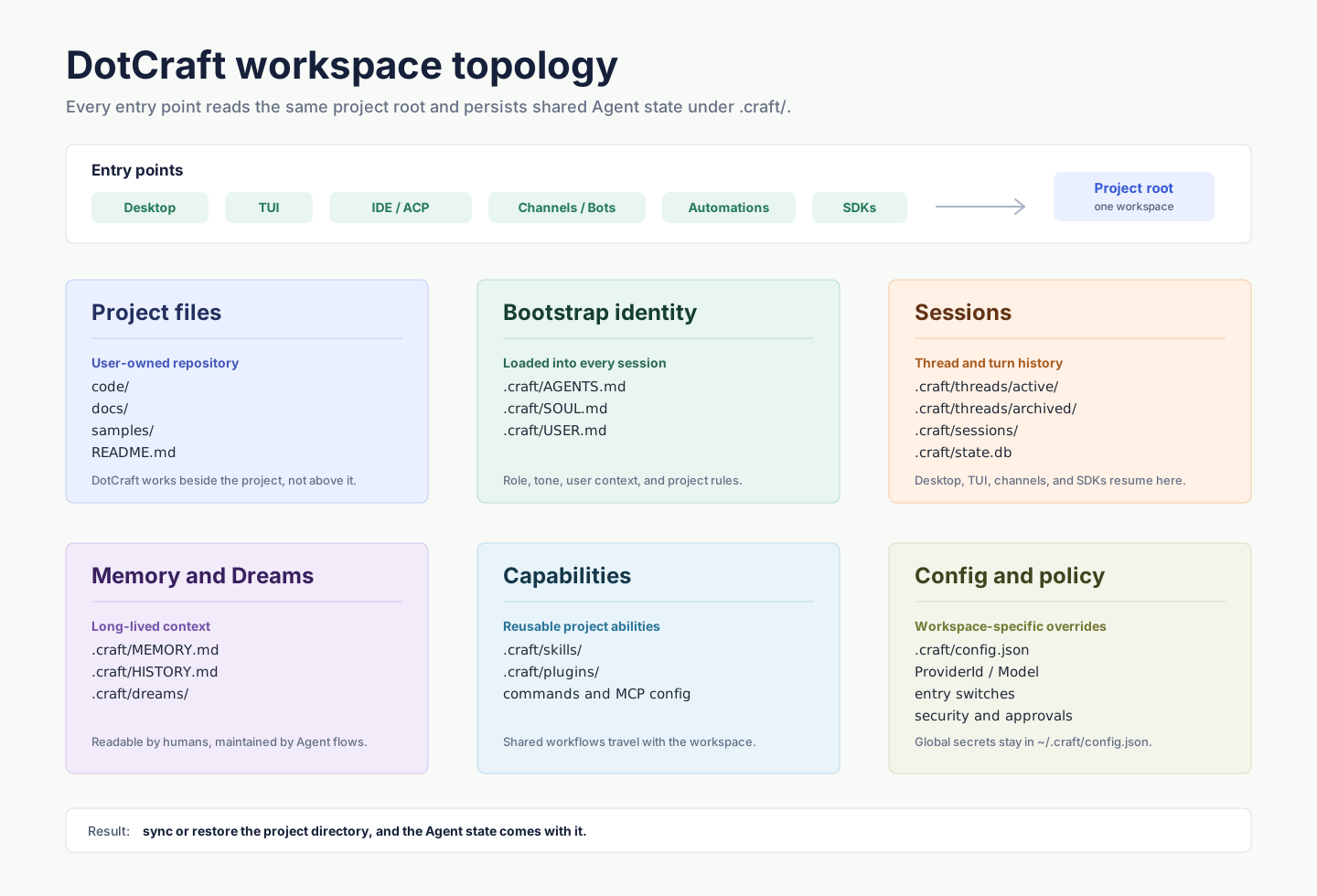
Every entry point reads the workspace before doing anything. That means:
- Switching entry points never loses context: a session opened in Desktop continues in TUI.
- Restoring on another machine costs nothing: sync the project directory.
- Teams share one baseline: commit the shareable parts of
.craft/(skills, commands, AGENTS.md) and every teammate's Desktop boots with the same agent constraints.
Global vs Workspace Config
DotCraft layers two configuration files:
| Layer | Path | Purpose |
|---|---|---|
| Global | ~/.craft/config.json | Provider credentials, endpoints, personal preferences — not committed |
| Workspace | <workspace>/.craft/config.json | Model selection, entry-point switches, automations, security — committable |
When in doubt: put providers globally and let the workspace override only the project-specific choices. Provider fields, entry switches, memory, skills, automations, and security options all live in the Configuration Reference.
Bootstrap Trio
The three Markdown files under .craft/ decide "who this agent is in this project and what rules it follows":
AGENTS.md— role responsibilities, behavior boundaries, answer rulesSOUL.md— personality, tone, expression styleUSER.md— user profile, audience background, communication preferences
They are plain Markdown with no special syntax. DotCraft injects them into the system prompt at every session start.
First Entry
| Step | Command or action |
|---|---|
| Open in Desktop | Launch Desktop → choose project folder → follow setup |
| Init from terminal | cd <project> → dotcraft setup and answer prompts |
| Verify | In Desktop, ask "Read README and docs/index.md and tell me how to start the project" |
Full walkthrough: Getting Started.