
AppServer Mode
AppServer is DotCraft's wire protocol server. It exposes Agent capabilities (session management, tool invocation, approval flows) to external clients via JSON-RPC. TUI, Desktop, ACP, external channel adapters, and custom integrations can all connect to the same AppServer.
Use cases:
- Custom IDE / editor integrations
- Remote development (clients connecting to a remote AppServer)
- Multiple clients sharing the same workspace
- Building non-C# clients (any language with WebSocket / stdio support)
NOTE
Day-to-day Desktop / TUI go through Hub local coordination. This page is for manual AppServer management.
Starting AppServer
# stdio (default, for subprocess communication)
dotcraft app-server

# Pure WebSocket (for remote, multi-client)
dotcraft app-server --listen ws://127.0.0.1:9100

# stdio + WebSocket dual mode
dotcraft app-server --listen ws+stdio://127.0.0.1:9100
Connecting from the Command Line
# One-shot task
dotcraft exec --remote ws://127.0.0.1:9100/ws "Summarize this workspace"

# With token auth
dotcraft exec --remote ws://server:9100/ws --token my-secret "Summarize this workspace"
Command-Line Reference
Subcommands and Global Options
| Command / Option | Description |
|---|---|
dotcraft exec <prompt> | Run a one-off command-line Agent task |
dotcraft exec - | Read input from stdin and run a one-off task |
dotcraft app-server | Start AppServer (defaults to stdio) |
--listen <URL> | AppServer transport, used with app-server |
--remote <URL> | Client connection to a remote AppServer, used with exec or ACP |
--token <VALUE> | WebSocket auth token, used with --listen or --remote |
--listen URL Schemes
| Scheme | Transport | stdout | Example |
|---|---|---|---|
stdio:// | Pure stdio (default) | Reserved for JSON-RPC | --listen stdio:// |
ws://host:port | Pure WebSocket | Normal console output | --listen ws://127.0.0.1:9100 |
wss://host:port | Pure WebSocket (TLS) | Normal console output | --listen wss://0.0.0.0:9100 |
ws+stdio://host:port | stdio + WebSocket | Reserved for JSON-RPC | --listen ws+stdio://127.0.0.1:9100 |
Transport Modes
stdio (Default)
AppServer communicates over stdin/stdout using newline-delimited JSON (JSONL). This is the local subprocess communication method commonly used by TUI, Desktop, ACP, and custom clients.
Client (stdin) → JSON-RPC Request → AppServer
AppServer → JSON-RPC Response/Notification → Client (stdout)
AppServer → Diagnostic logs → stderrProperties:
- 1:1 communication (one client per server process)
- stdout is reserved for the wire protocol; console logs go to stderr
- No network configuration; ideal for local development
WebSocket
AppServer starts a WebSocket listener on the given address. Each text frame carries a complete JSON-RPC message.
dotcraft app-server --listen ws://127.0.0.1:9100Properties:
- Multiple concurrent client connections (each with independent init state and thread subscriptions)
- stdout is free; console output works normally
- Supports remote connections and network authentication
stdio + WebSocket Dual Mode
dotcraft app-server --listen ws+stdio://127.0.0.1:9100For deployments that need both subprocess and remote connections.
Security Authentication
When AppServer listens on a non-loopback address (not 127.0.0.1 / ::1), strongly set up token authentication.
Server
dotcraft app-server --listen ws://0.0.0.0:9100 --token my-secretClient
dotcraft exec --remote ws://server:9100/ws --token my-secret "Check status"The token is passed via the WebSocket query: ws://host:port/ws?token=<value>.
CAUTION
Binding to 0.0.0.0 without a token leaves AppServer fully open.
Configuration
Command-Line (Recommended)
CLI arguments override config-file values:
dotcraft app-server --listen ws://127.0.0.1:9100 --token my-secretconfig.json (Alternative)
Suitable for fixed deployments. ExternalChannels tells DotCraft how to launch an external adapter; structured delivery capabilities and channelTools are not in config — adapters declare them dynamically during initialize.
AppServer config
| Field | Description | Default |
|---|---|---|
AppServer.Mode | Transport: Disabled / Stdio / WebSocket / StdioAndWebSocket | Disabled |
AppServer.WebSocket.Host | WebSocket bind address | 127.0.0.1 |
AppServer.WebSocket.Port | WebSocket bind port | 9100 |
AppServer.WebSocket.Token | WebSocket auth token | empty |
CLI client config
| Field | Description | Default |
|---|---|---|
CLI.AppServerUrl | Remote AppServer URL used by dotcraft exec | empty |
CLI.AppServerToken | Remote auth token used by dotcraft exec | empty |
CLI.AppServerBin | Custom executable used when dotcraft exec starts a local Hub/AppServer | empty (current process) |
Examples
{
    "AppServer": {
        "Mode": "WebSocket",
        "WebSocket": {
            "Host": "0.0.0.0",
            "Port": 9100,
            "Token": "my-secret"
        }
    }
}{
"CLI": {
"AppServerUrl": "ws://server:9100/ws",
"AppServerToken": "my-secret"
}
}How It Works
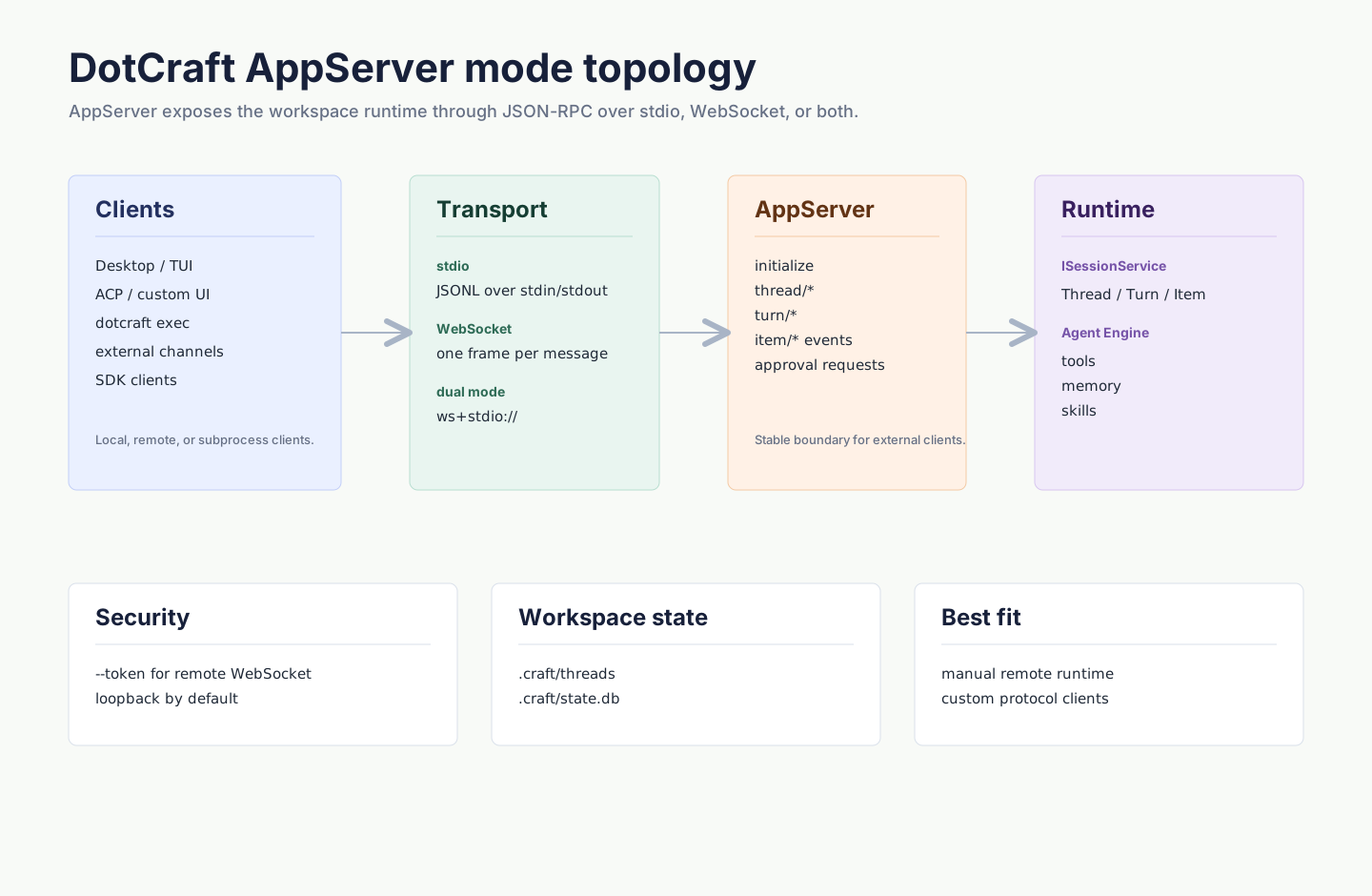
| Scenario | Approach |
|---|---|
| Run one task from a script | dotcraft exec "..." |
| Share one backend across Desktop / TUI / ACP | dotcraft app-server --listen ws://127.0.0.1:9100 |
| Connect to a remote workspace | Listen with WebSocket; clients connect to /ws |
| Build a custom client | Speak JSON-RPC 2.0 over stdio or WebSocket |
Troubleshooting
WebSocket clients cannot connect
Confirm the server was started with --listen ws://... or ws+stdio://..., and the client URL includes /ws.
Authentication fails
When the server sets --token, all clients (TUI, Desktop, ACP, dotcraft exec, custom) must send the same token. Do not use an empty token for remote deployments.
Related
- Configuration Reference —
AppServer.*/CLI.*fields - AppServer Protocol — client protocol overview
- Hub Local Coordination — the path Desktop / TUI take by default
- Unified Session Core — Thread / Turn / Item model