
Hub Protocol
Hub Protocol is the local protocol DotCraft clients use to discover and manage workspace AppServers. It is intended for Desktop, TUI, editor extensions, and other local clients. If you want to talk to the agent, normal session traffic still uses AppServer Protocol.
Hub coordinates local runtimes. It is not a session proxy:
- Hub manages workspace AppServers through an HTTP JSON API.
- Hub broadcasts lifecycle events through Server-Sent Events.
- Hub does not expose AppServer JSON-RPC methods such as
thread/*,turn/*,approval/*, ormcp/*. - After calling
appservers/ensure, clients connect directly to the returned AppServer WebSocket endpoint.
When To Use It
Implement a Hub client when:
- You are building the DotCraft app, TUI, an IDE extension, or a local GUI.
- You want multiple local clients to share one runtime per workspace.
- You need to show local workspace status, tray menus, or system notifications.
- You want to start AppServer on demand while avoiding duplicate AppServers for the same workspace.
If your client connects to a remote AppServer, or if you manage the AppServer process yourself, you can skip Hub.
Protocol
Hub Local API uses HTTP JSON over loopback. All JSON fields use camelCase.
| Capability | Description |
|---|---|
| Discovery | Read ~/.craft/hub/hub.lock |
| API transport | HTTP JSON |
| Event transport | Server-Sent Events (GET /v1/events) |
| Address | Loopback by default |
| Auth | Protected endpoints use Authorization: Bearer <token> |
| Status check | GET /v1/status is public |
Typical hub.lock content:
{
  "pid": 12345,
  "apiBaseUrl": "http://127.0.0.1:49231",
  "token": "local-random-token",
  "startedAt": "2026-04-30T06:30:00Z",
  "version": "0.1.0",
  "binaryPath": "/path/to/dotcraft"
}
After reading the lock file, clients should verify:
- The recorded
pidstill points to a live process. GET {apiBaseUrl}/v1/statussucceeds.- The returned URL, version, capabilities, and optional
binaryPathmatch what the client expects.
If verification fails, stop trusting that lock file and start dotcraft hub if local auto-start is enabled.
Bootstrap Flow
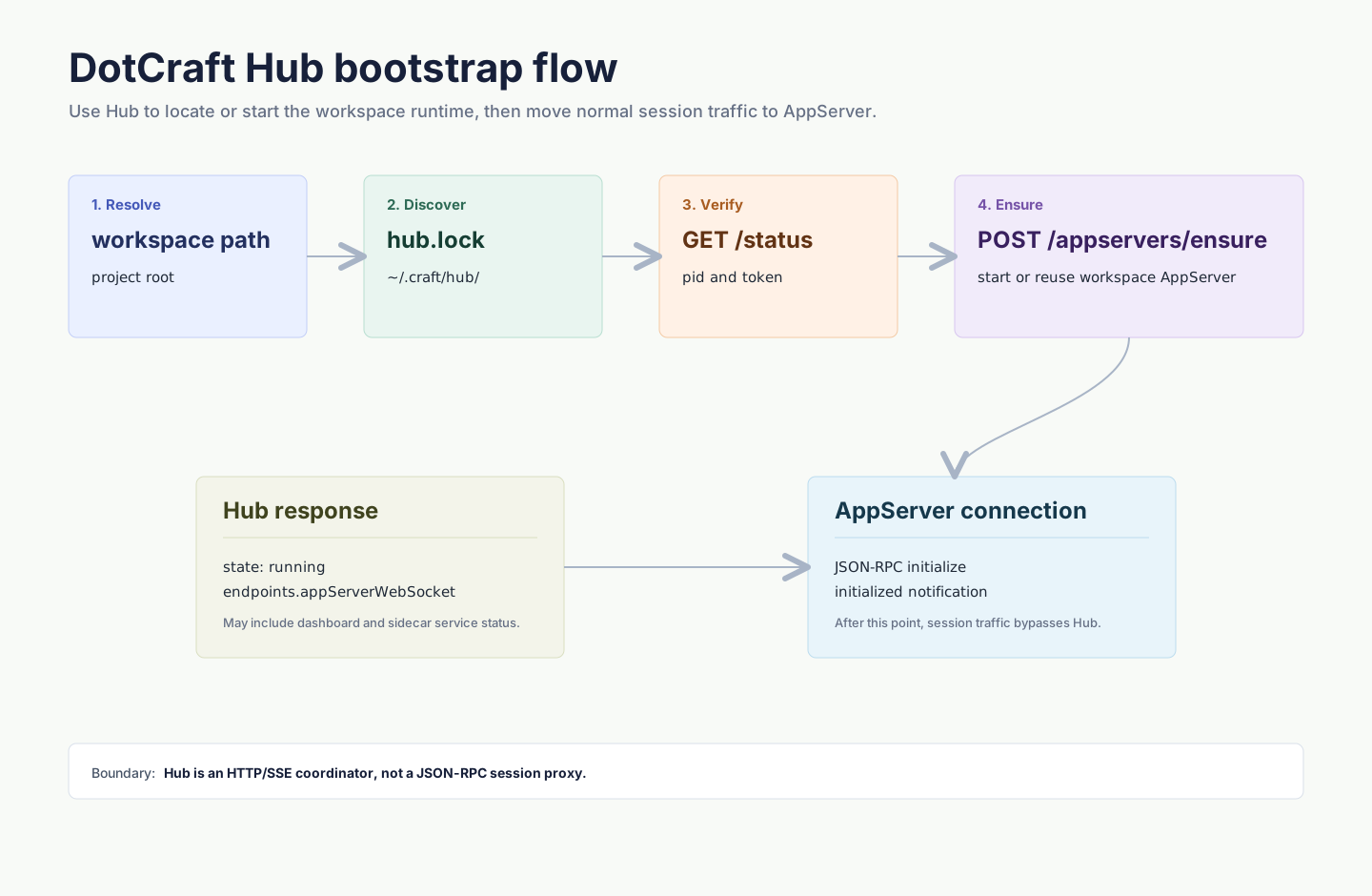
Once the client connects to AppServer, normal session traffic no longer goes through Hub.
Authentication
Every management endpoint except GET /v1/status requires a bearer token:
Authorization: Bearer <token-from-hub-lock>Unauthorized response:
{
  "error": {
    "code": "unauthorized",
    "message": "Missing or invalid Hub token.",
    "details": null
  }
}
Hub is a same-OS-user local coordinator, not a cross-user security boundary. Do not expose the Hub API on a non-loopback network.
API Overview
| Endpoint | Auth | Description |
|---|---|---|
GET /v1/status | no | Return Hub metadata and capabilities. |
POST /v1/shutdown | yes | Stop Hub and trigger managed AppServer cleanup. |
POST /v1/appservers/ensure | yes | Ensure a workspace AppServer is available, starting it if needed. |
GET /v1/appservers | yes | List live and known workspace AppServers. |
GET /v1/appservers/by-workspace?path=... | yes | Inspect one workspace without starting a process. |
POST /v1/appservers/stop | yes | Stop one Hub-managed workspace AppServer. |
POST /v1/appservers/restart | yes | Restart a workspace AppServer. |
GET /v1/events | yes | Subscribe to Hub lifecycle events. |
POST /v1/notifications/request | yes | Request a local notification for Desktop or tray UI. |
GET /v1/status
Example response:
{
  "hubVersion": "0.1.0",
  "pid": 12345,
  "startedAt": "2026-04-30T06:30:00Z",
  "statePath": "/Users/me/.craft/hub",
  "apiBaseUrl": "http://127.0.0.1:49231",
  "binaryPath": "/path/to/dotcraft",
  "capabilities": {
    "appServerManagement": true,
    "portManagement": true,
    "events": true,
    "notifications": true,
    "tray": false
  }
}
tray: false means Hub is headless. Desktop owns tray and notification UI.
POST /v1/appservers/ensure
Example request:
{
  "workspacePath": "/Users/me/project",
  "client": {
    "name": "my-client",
    "version": "0.1.0"
  },
  "startIfMissing": true,
  "runtimeTools": {
    "ripgrepPath": "/absolute/path/to/rg"
  }
}
Example response:
{
  "workspacePath": "/Users/me/project",
  "canonicalWorkspacePath": "/Users/me/project",
  "state": "running",
  "pid": 23456,
  "endpoints": {
    "appServerWebSocket": "ws://127.0.0.1:49300/ws?token=..."
  },
  "serviceStatus": {
    "appServerWebSocket": {
      "state": "allocated",
      "url": "ws://127.0.0.1:49300/ws?token=...",
      "reason": null
    },
    "dashboard": {
      "state": "disabled",
      "url": null,
      "reason": "Dashboard or tracing is disabled."
    }
  },
  "serverVersion": "0.1.0",
  "startedByHub": true,
  "exitCode": null,
  "lastError": null,
  "recentStderr": null
}
Important fields:
state: one ofstopped,starting,running,unhealthy,stopping,exited.endpoints.appServerWebSocket: the URL your client should use for AppServer Protocol.serviceStatus: optional service state fordashboardand runtime helpers.startedByHub: whether the current process is managed by this Hub.
If startIfMissing is false, clients can inspect state without creating a new process.
runtimeTools contains optional local runtime hints. Desktop uses it to pass its bundled rg executable, TypeScript module runtime, and built-in plugin roots to AppServer. Hub only forwards these values as environment variables such as DOTCRAFT_RG_PATH, DOTCRAFT_MODULES_DIR, and DOTCRAFT_BUILTIN_PLUGIN_ROOTS; it does not echo them in status responses.
If Hub finds a stale workspace appserver.lock, it removes the stale lock and continues. If the lock points to a live AppServer whose appServerWebSocket endpoint accepts an initialize handshake, Hub may return that endpoint with startedByHub: false and serviceStatus entries marked external. If the live lock cannot be safely reused, Hub returns workspaceLocked.
Stop And Restart
Stop request:
{
  "workspacePath": "/Users/me/project"
}
Restart uses the same body and may also include runtimeTools.
Notifications
Notification request:
{
  "workspacePath": "/Users/me/project",
  "kind": "turn.completed",
  "title": "Task completed",
  "body": "The agent finished the requested change.",
  "severity": "success",
  "source": "appserver",
  "threadId": "thread_abc",
  "actionUrl": "dotcraft://workspace/open?path=/Users/me/project&threadId=thread_abc",
  "openDesktopOnClick": true
}
Response:
{
  "accepted": true
}
severity is normalized to info, success, warning, or error.
threadId, actionUrl, and openDesktopOnClick are optional. AppServer turn notifications use dotcraft://workspace/open only for threads that originated in Desktop. Notifications for other origins should set openDesktopOnClick: false so a click does not launch Desktop.
Events
Subscribe with:
GET /v1/events
Authorization: Bearer <token>
Accept: text/event-stream
Hub sends standard SSE records:
event: appserver.running
data: {"kind":"appserver.running","at":"2026-04-30T06:31:00Z","workspacePath":"/Users/me/project","data":{"pid":23456,"endpoints":{"appServerWebSocket":"ws://127.0.0.1:49300/ws?token=..."}}}
Known event kinds include:
| Event | Description |
|---|---|
hub.started | Hub has started. |
hub.stopping | Hub is stopping. |
port.allocated | Hub allocated a local port for a service. |
appserver.starting | A workspace AppServer is starting. |
appserver.running | A workspace AppServer is ready. |
appserver.exited | A workspace AppServer exited. |
appserver.unhealthy | A health check failed. |
notification.requested | A local notification is waiting for UI display. |
Event payloads are extensible. Clients should render known fields by kind and ignore unknown fields.
Connect To AppServer
After receiving endpoints.appServerWebSocket, open that WebSocket and initialize AppServer Protocol:
{
  "jsonrpc": "2.0",
  "id": 0,
  "method": "initialize",
  "params": {
    "clientInfo": {
      "name": "my-client",
      "title": "My Client",
      "version": "0.1.0"
    },
    "capabilities": {
      "approvalSupport": true,
      "streamingSupport": true
    }
  }
}
Then send:
{
  "jsonrpc": "2.0",
  "method": "initialized",
  "params": {}
}
See AppServer Protocol for session methods.
Errors
Errors use one shape:
{
  "error": {
    "code": "workspaceLocked",
    "message": "A live process appears to own the workspace AppServer lock.",
    "details": {
      "workspacePath": "/Users/me/project",
      "pid": 23456
    }
  }
}
Common error codes:
| Code | HTTP | Description |
|---|---|---|
unauthorized | 401 | Missing or invalid token. |
workspaceNotFound | 400/404 | Workspace path is missing, does not exist, or is not a DotCraft workspace. |
workspaceLocked | 409 | Another live AppServer owns the workspace lock and could not be safely reused. |
appServerStartFailed | 500 | Managed AppServer failed during startup. |
appServerUnhealthy | 500 | Managed AppServer failed readiness or health checks. |
portUnavailable | 500 | Hub could not allocate a required local port. |
invalidNotification | 400 | Notification request is invalid. |
Client Recommendations
- Use Hub by default for local workspaces, while keeping explicit remote AppServer mode as an advanced path.
- After starting Hub, reread
hub.lockand verify/v1/status; do not assume the process is ready immediately. - Render
appserver.unhealthyandappserver.exitedas actionable UI states, such as "restart workspace runtime." - Do not log Hub tokens or AppServer tokens.
- Keep unknown endpoints, service statuses, and event kinds forward-compatible.