
Unified Session Core
DotCraft does not maintain a separate agent loop per client. The Unified Session Core consolidates execution, state, approvals, and observability into a single engine. CLI, Desktop, TUI, ACP, QQ bots, and automations all connect to the same core.
Model: Thread → Turn → Item
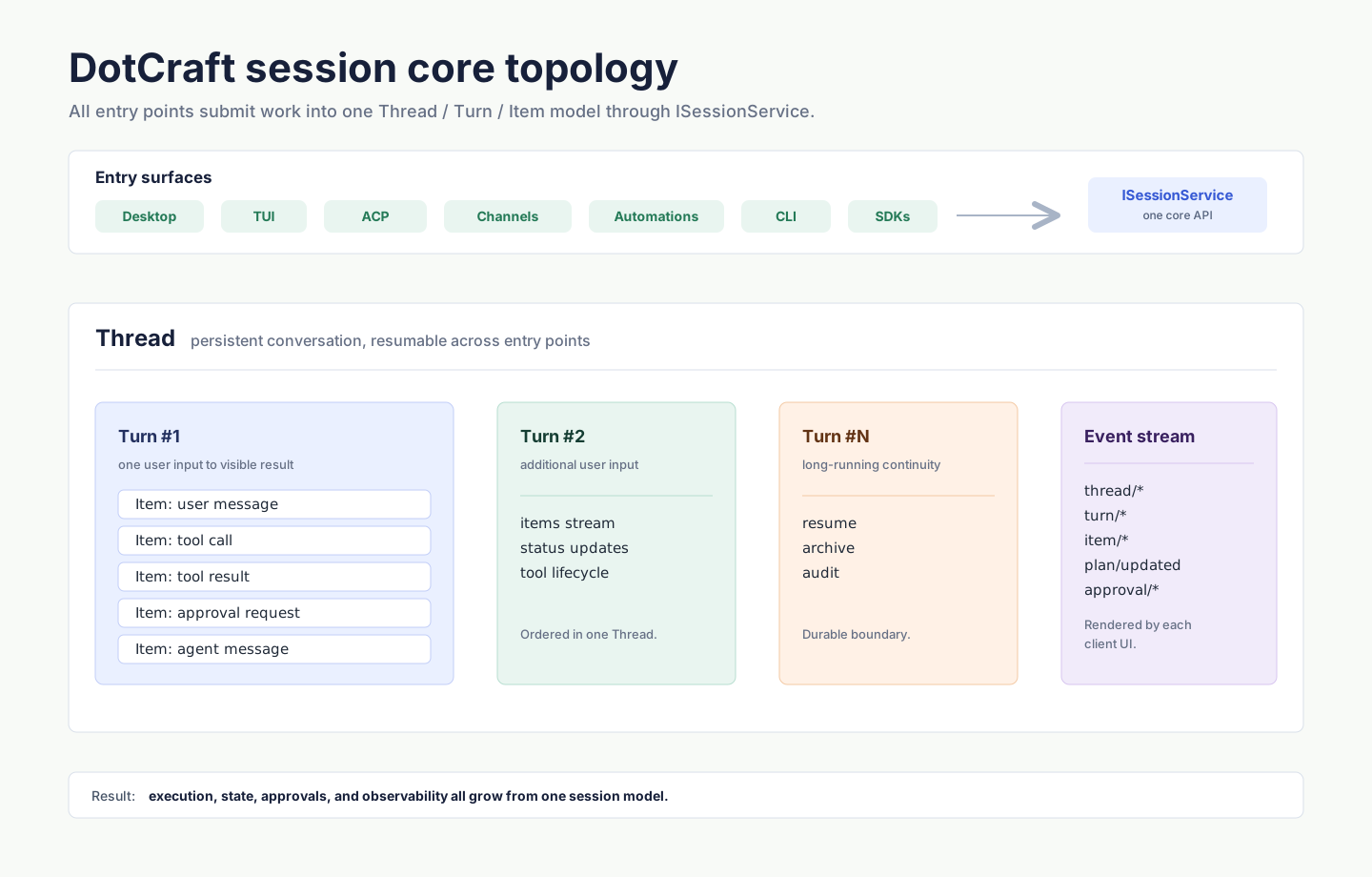
| Entity | Meaning |
|---|---|
| Thread | A long-running conversation. Shareable across entry points, resumable, observable, auditable. |
| Turn | One logical "user input → agent work → user-visible result" unit. |
| Item | The smallest event inside a Turn: user message, agent message, tool call, tool result, thought, approval, etc. |
ISessionService is the core API: thread lifecycle, input submission, streaming event subscription, approval flow. Every entry point (CLI, ACP, Automations, external channel adapters) talks to the engine through it.
How Cross-Entry Sharing Works
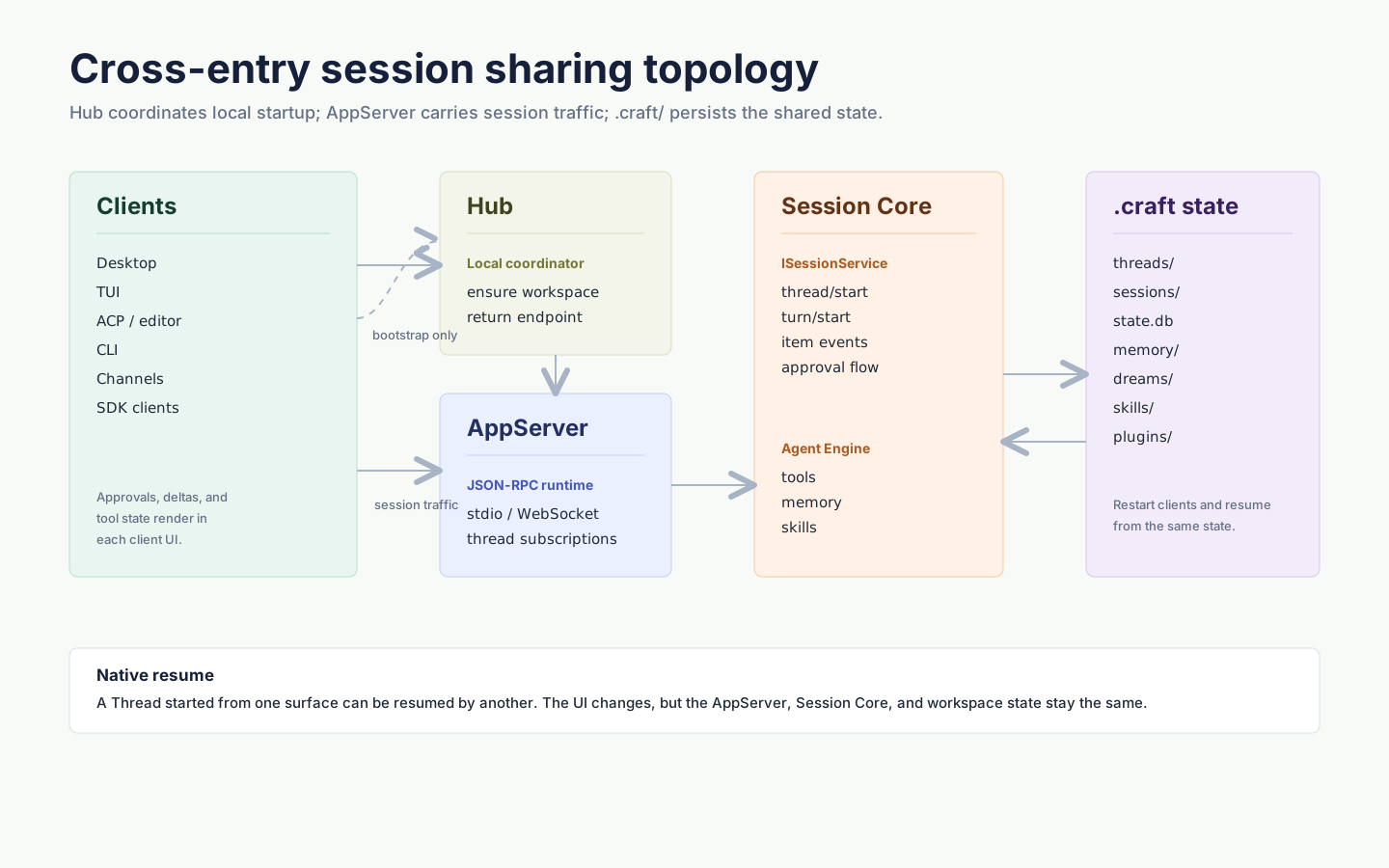
Key points:
- Hub assembles one AppServer per workspace on the local machine. Desktop and TUI use this path by default, so opening the same project from any entry connects to the same process.
- AppServer projects
ISessionServiceas JSON-RPC (full protocol). Any language can implement a client. - Workspace
.craft/is the persistence layer: threads inthreads/, session metadata insessions/, dreams indreams/. After a restart, any entry point can resume.
Approvals & Human-in-the-Loop
Session Core surfaces "may this tool call run" as a discrete approval event, so each frontend can render it natively:
| Entry | How approval is shown |
|---|---|
| Desktop | Modal / Approvals panel |
| TUI | Inline shortcut |
| ACP (IDE) | Forwarded as requestPermission to the editor UI |
| QQ / WeCom / channels | Native platform reply |
NOTE
When the same Thread is picked up by a different entry point, approval UI uses each platform's native form — Desktop never stuffs a QQ group message into its own modal.
Cross-Channel Resume
| Dimension | Without unified session core | DotCraft Unified Session Core |
|---|---|---|
| Client customization | Message bus loses semantics, hard to customize | Every client renders thinking, diffs, approvals, tool calls as it likes |
| Approval / HITL | Cannot express native interactions | Each platform uses its own UI |
| Cross-channel resume | Not supported | The same Thread can be picked up by any connected entry |
| Workspace persistence | Not supported | Naturally archived in .craft/ |
Typical flows:
- Draft a PR in Desktop in the morning, continue review on a phone via ACP after work — same Thread.
- A Cron-triggered automation hits an approval midway, Desktop notifies, you approve or amend.
- A user pings a WeChat bot, the bot replies, an engineer opens Desktop and sees the same Thread to follow up.
Hub vs AppServer
DotCraft has two layers of local coordination:
- Hub — Per-user coordinator that starts/reuses one AppServer per workspace and prevents the same workspace from being held by multiple AppServers. Desktop / TUI users do not need to think about it.
- AppServer — Per-workspace runtime that owns every Thread / tool / approval / event stream.
When you need direct control (remote deploy, CI, bots, debugging), see:
- AppServer Mode — manual start,
--listen,--token, remote connect - Hub Protocol — implement a Hub client
- AppServer Protocol — implement an AppServer client
When to Care About Session Core
| Role | Should you care |
|---|---|
| Casual Desktop user | No |
| Sharing a workspace across multiple clients | Read AppServer Mode |
| Building bots or external channels | Read Python SDK or TypeScript SDK |
| Integrating a new IDE / editor | Read ACP / Editors |
| Building a custom protocol-level client | Read AppServer Protocol |
Related
- Entry Points overview — comparison table & decision matrix
- Observability — Trace, approvals, tool calls in Dashboard
- AppServer Mode — remote / multi-client / custom integrations