
AppServer Protocol
AppServer Protocol is DotCraft's JSON-RPC wire protocol for external clients. Desktop, TUI, ACP bridges, external channel adapters, and custom IDE clients can use it to create or resume threads, submit user input, consume streaming events, and participate in command or file-change approvals.
If you only need to find or start a local workspace AppServer, use Hub Protocol first. After Hub returns an AppServer WebSocket endpoint, session traffic uses this protocol.
When To Use It
Use AppServer Protocol when you want to:
- Build Desktop, TUI, IDE, editor, or browser frontends.
- Build non-C# clients in Node.js, Python, Rust, Swift, or another language.
- Embed DotCraft into an existing product while reusing sessions, tools, approvals, and streaming events.
- Implement an external channel adapter that connects social platforms or bots to the same workspace runtime.
For one-shot automation scripts, prefer the CLI or SDK. AppServer Protocol is designed for long-lived connections and rich UIs.
Protocol
AppServer Protocol uses JSON-RPC 2.0. Every message includes "jsonrpc": "2.0".
| Message kind | id | method | Direction |
|---|---|---|---|
| Request | yes | yes | client to server or server to client |
| Response | yes | no | replies to a request |
| Notification | no | yes | client to server or server to client |
Request:
{
  "jsonrpc": "2.0",
  "id": 1,
  "method": "thread/list",
  "params": {}
}
Response:
{
  "jsonrpc": "2.0",
  "id": 1,
  "result": {
    "data": []
  }
}
Notification:
{
  "jsonrpc": "2.0",
  "method": "turn/started",
  "params": {
    "turn": {
      "id": "turn_001"
    }
  }
}
Transports
| Transport | Wire format | Use case |
|---|---|---|
stdio | UTF-8 JSONL; one full JSON-RPC message per line | Subprocess clients, one-to-one connections, default mode |
websocket | One full JSON-RPC message per WebSocket text frame | Multi-client workspace sharing, Hub-managed local mode, remote connections |
In stdio mode, stdout is reserved for protocol messages. Logs and diagnostics should go to stderr.
In WebSocket mode, each connection has independent initialization state and thread subscriptions. With Hub-managed local mode, clients usually connect to the URL returned in endpoints.appServerWebSocket.
Initialization
The first request on every connection must be initialize. After it succeeds, the client must send an initialized notification.
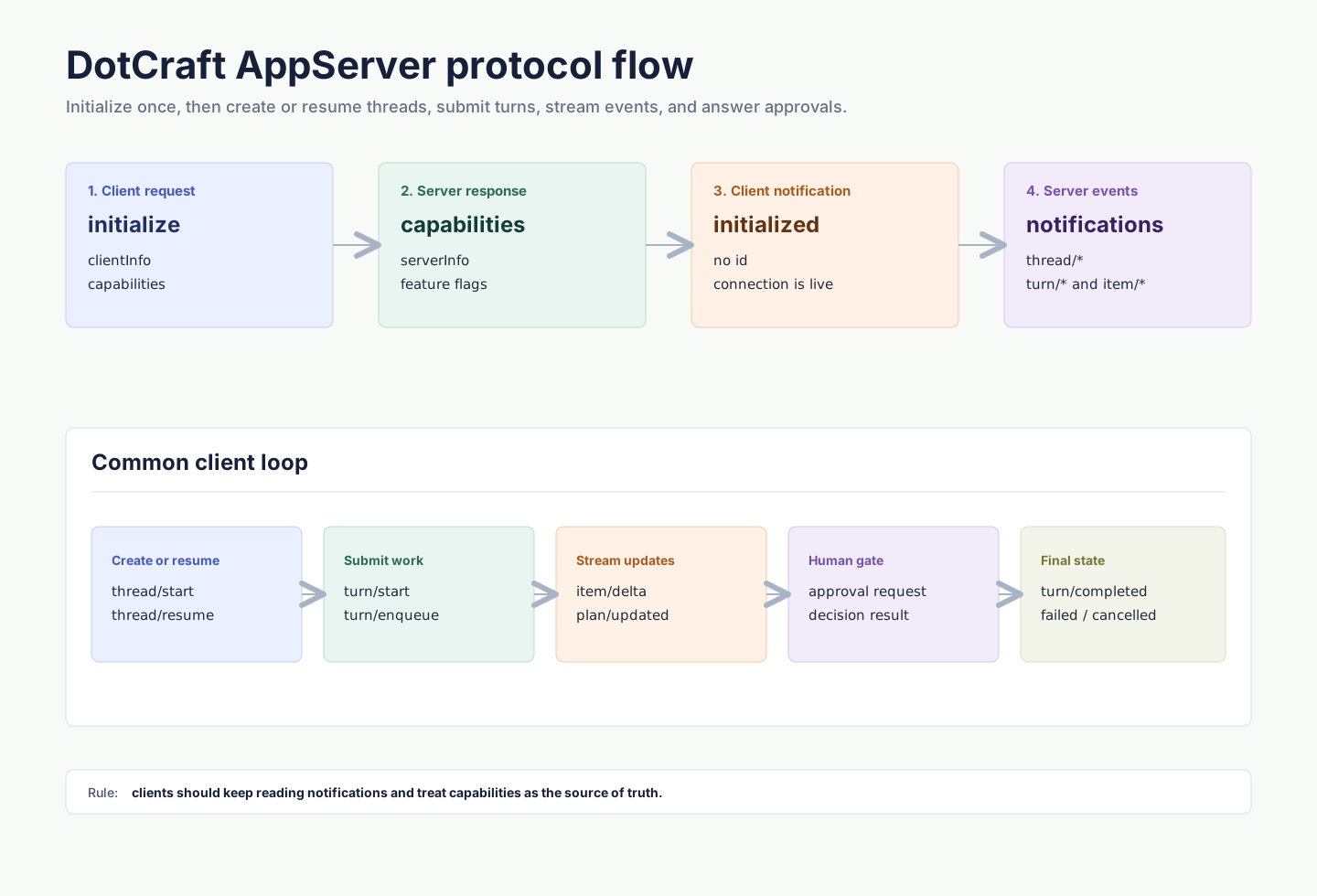
Initialize request:
{
  "jsonrpc": "2.0",
  "id": 0,
  "method": "initialize",
  "params": {
    "clientInfo": {
      "name": "my-client",
      "title": "My Client",
      "version": "0.1.0"
    },
    "capabilities": {
      "approvalSupport": true,
      "streamingSupport": true,
      "commandExecutionStreaming": true,
      "toolExecutionLifecycle": true,
      "configChange": true
    }
  }
}
The response returns server info and capabilities:
{
  "jsonrpc": "2.0",
  "id": 0,
  "result": {
    "serverInfo": {
      "name": "dotcraft",
      "version": "0.2.0",
      "protocolVersion": "1",
      "extensions": ["acp"]
    },
    "capabilities": {
      "threadManagement": true,
      "threadSubscriptions": true,
      "dynamicToolRebind": true,
      "runtimeAdditionalContext": true,
      "approvalFlow": true,
      "skillsManagement": true,
      "pluginManagement": true,
      "skillVariants": true,
      "modelCatalogManagement": true,
      "mcpManagement": true
    }
  }
}
Then send:
{
  "jsonrpc": "2.0",
  "method": "initialized",
  "params": {}
}
Requests sent before initialization are rejected. Repeated initialize calls on the same connection are also rejected.
Core Primitives
| Primitive | Description |
|---|---|
| Thread | A resumable conversation with workspace, origin channel, configuration, and turns. |
| Turn | One user input and the agent work it triggers. |
| Item | A unit inside a turn, such as user message, agent message, command execution, file change, tool call, plan, or reasoning. |
Common flow:
- Call
thread/startto create a thread, orthread/resumeto continue one. - Call
turn/startto submit user input. - Keep reading
turn/*anditem/*notifications. - If the server sends an approval request, render UI and return a decision.
- Update UI state when
turn/completed,turn/failed, orturn/cancelledarrives.
Threads
Creating a thread requires an identity that identifies the client/channel, user, and workspace owner:
{
  "jsonrpc": "2.0",
  "id": 1,
  "method": "thread/start",
  "params": {
    "identity": {
      "channelName": "desktop",
      "userId": "local-user",
      "channelContext": "workspace:/Users/me/project",
      "workspacePath": "/Users/me/project"
    },
    "historyMode": "server",
    "displayName": "Fix tests"
  }
}
Response:
{
  "jsonrpc": "2.0",
  "id": 1,
  "result": {
    "thread": {
      "id": "thread_20260316_x7k2m4",
      "workspacePath": "/Users/me/project",
      "userId": "local-user",
      "originChannel": "desktop",
      "status": "active",
      "turns": []
    }
  }
}
The server also broadcasts thread/started. In multi-client deployments, the initiating client may receive both the response and the broadcast; dedupe by thread id.
Common thread methods:
| Method | Description |
|---|---|
thread/start | Create a new thread. |
thread/resume | Resume an existing thread. |
thread/list | List threads by identity. |
thread/read | Read thread data, history, and the current persisted plan without necessarily resuming execution context. |
thread/subscribe | Subscribe to thread events. |
thread/unsubscribe | Unsubscribe from thread events. |
thread/rename | Update the display name. |
thread/delete | Delete a thread. |
thread/config/update | Update thread configuration. |
thread/mode/set | Switch agent mode, such as plan or agent. |
thread/list accepts optional query, limit, and opaque cursor params. When paged, the result includes nextCursor and totalMatched; callers that omit both limit and cursor keep receiving the full compatible list.
thread/read accepts optional turnLimit and opaque cursor params. Paged reads return the newest page first, keep turns oldest-first within the page, and include turnPage metadata with nextCursor for older history. queuedInputs remains current thread state and is returned independently of turn-history pagination.
Runtime Dynamic Tools and App Context
Clients that expose Runtime Dynamic Tools can also attach compact app context on thread/start or thread/resume. Use additionalContext for short model-visible guidance that helps the agent discover or use client-owned capabilities, especially deferred tools.
Check capabilities.runtimeAdditionalContext before sending additionalContext:
{
  "jsonrpc": "2.0",
  "id": 3,
  "method": "thread/resume",
  "params": {
    "threadId": "thread_20260316_x7k2m4",
    "additionalContext": {
      "myapp.threadGuidance": {
        "kind": "application",
        "value": "When the user asks about MyApp issues, search for the relevant MyApp tool first."
      }
    }
  }
}
kind currently supports only "application". Keep value concise; do not include secrets, authorization material, or large state snapshots. The server renders each entry into the System prompt inside <app-context>...</app-context>. It is app context, not a higher-priority instruction.
On thread/resume, omitting additionalContext keeps the current runtime context; sending {} clears it.
Turns
turn/start submits user input and starts agent execution. The response returns the initial turn immediately; later output streams through notifications.
{
  "jsonrpc": "2.0",
  "id": 2,
  "method": "turn/start",
  "params": {
    "threadId": "thread_20260316_x7k2m4",
    "input": [
      {
        "type": "text",
        "text": "Run the tests and fix any failures."
      }
    ]
  }
}
Response:
{
  "jsonrpc": "2.0",
  "id": 2,
  "result": {
    "turn": {
      "id": "turn_001",
      "threadId": "thread_20260316_x7k2m4",
      "status": "running",
      "items": []
    }
  }
}
input is a tagged union. Common types include:
text: plain user text.commandRef: structured slash-command reference.skillRef: structured skill reference.fileRef: structured file reference.image: remote image URL.localImage: local image path with optional MIME metadata.
If a turn is already running, Desktop-style clients usually use turn/enqueue to queue the next input, or turn/interrupt to cancel the current turn.
Events
AppServer pushes thread, turn, and item state through notifications. Clients should keep reading the transport stream and treat item/completed as the final state for that item.
Common notifications:
| Notification | Description |
|---|---|
thread/started | Thread created. |
thread/resumed | Thread resumed. |
thread/deleted | Thread deleted. |
thread/renamed | Display name changed. |
thread/runtimeChanged | Runtime state changed. |
turn/started | Turn started. |
turn/completed | Turn completed successfully. |
turn/failed | Turn failed. |
turn/cancelled | Turn was cancelled. |
turn/diff/updated | File-change diff updated. |
plan/updated | Plan updated, with source threadId and the complete plan/todo snapshot. |
item/started | Item started. |
item/completed | Item completed with final state. |
item/agentMessage/delta | Agent message text delta. |
item/reasoning/delta | Reasoning delta. |
item/commandExecution/outputDelta | Command output delta. |
item/toolCall/argumentsDelta | Tool-call argument delta. |
When a client declares capabilities.toolExecutionLifecycle: true, the server may also send toolExecution item lifecycle events: item/started marks one tool invocation as executing, and item/completed marks that callId as finished. This is a UI/runtime enhancement for updating individual parallel tool cards early; the matching toolResult remains the complete authoritative result.
Clients can suppress specific notifications for the current connection by passing exact method names in initialize.params.capabilities.optOutNotificationMethods.
Approvals
When command execution, file changes, or other sensitive operations require human confirmation, the server sends a server-initiated JSON-RPC request. The client must render approval UI and return a decision.
Command approval example:
{
  "jsonrpc": "2.0",
  "id": 50,
  "method": "item/approval/request",
  "params": {
    "threadId": "thread_20260316_x7k2m4",
    "turnId": "turn_001",
    "itemId": "item_005",
    "requestId": "approval_001",
    "approvalType": "shell",
    "operation": "dotnet test",
    "target": "/Users/me/project",
    "scopeKey": "shell:*",
    "reason": "Agent wants to execute a shell command."
  }
}
Response:
{
  "jsonrpc": "2.0",
  "id": 50,
  "result": {
    "decision": "accept"
  }
}
Common decisions include accept, acceptForSession, acceptAlways, decline, and cancel. Use the available decisions in the actual request payload as the source of truth.
If a client declares approvalSupport: false during initialize, the server handles non-interactive approval situations according to server policy. Rich UI clients should keep approvalSupport: true.
API Overview
The table below covers common method families used by AppServer clients.
| Family | Examples | Description |
|---|---|---|
| Initialization | initialize, initialized | Negotiate client and server capabilities. |
| Thread | thread/start, thread/list, thread/read, thread/subscribe | Conversation lifecycle and subscriptions. |
| Turn | turn/start, turn/enqueue, turn/interrupt | User input, queues, and cancellation. |
| Cron | cron/list, cron/remove, cron/enable | Scheduled task management. |
| Heartbeat | heartbeat/trigger | Manual heartbeat trigger. |
| Skills | skills/list, skills/read, skills/view, skills/restoreOriginal, skills/setEnabled, skills/uninstall | Skill discovery, effective view, restore original, enablement, and removable skill deletion. |
| Plugins | plugin/list, plugin/view, plugin/install, plugin/remove, plugin/setEnabled | Plugin discovery, detail, installation, removal, and enablement management. |
| Commands | command/list, command/execute | Custom command discovery and execution. |
| Models | model/list | Model catalog. |
| MCP | mcp/list, mcp/get, mcp/upsert, mcp/status/list, mcp/test | MCP configuration and status. |
| External channels | externalChannel/list, externalChannel/upsert | External channel configuration. |
| SubAgents | subagent/profiles/list, subagent/profiles/upsert | SubAgent profile management. |
| Workspace config | workspace/config/update | Workspace configuration updates. |
Clients should use capabilities from the initialize response before showing feature-specific UI.
Skill entries returned by skills/list may include hasVariant: true, which means the current runtime resolves that skill through a workspace adaptation. skills/read still reads the source SKILL.md; use skills/view when a client needs the effective content.
Plugin and Skill Management
Clients should check capabilities.skillsManagement before calling skills/*, and capabilities.pluginManagement before calling plugin/*.
skills/uninstall deletes removable workspace or personal skills only. System skills cannot be uninstalled; plugin-contained skills are managed by the plugin lifecycle and are not uninstalled separately. If the removed source skill has associated variants, the server also removes those workspace-local variants and broadcasts workspace/configChanged with regions: ["skills"].
Plugin lifecycle separates installation from enablement:
plugin/install: installs a Desktop-bundled built-in plugin into the current workspace at.craft/plugins/<id>/, writes a.builtinmarker, and enables it by default. Uninstalled built-ins are visible only when AppServer was launched withDOTCRAFT_BUILTIN_PLUGIN_ROOTS.plugin/setEnabled: only controls whether an installed plugin enters the Agent context. It does not install or delete plugin files.plugin/remove: removes only DotCraft-managed built-in plugin directories that carry a.builtinmarker. It does not delete user-owned local plugin directories.
Plugin install, remove, and enablement changes broadcast workspace/configChanged with regions: ["plugins", "skills"]. Tools contributed by plugins are projected in conversations as pluginFunctionCall items; they do not create companion toolCall / toolResult items. For the user-facing plugin model, see Plugins & Tools.
Minimal Node Client
This example starts AppServer over stdio, initializes the connection, creates a thread, and starts a turn:
import { spawn } from "node:child_process";
import readline from "node:readline";

const workspacePath = process.cwd();
const proc = spawn("dotcraft", ["app-server"], {
  cwd: workspacePath,
  stdio: ["pipe", "pipe", "inherit"],
});

const rl = readline.createInterface({ input: proc.stdout });
let nextId = 0;
let threadId: string | undefined;

function send(method: string, params?: unknown, id = ++nextId) {
  proc.stdin.write(
    JSON.stringify({ jsonrpc: "2.0", id, method, params: params ?? {} }) + "\n",
  );
  return id;
}

function notify(method: string, params?: unknown) {
  proc.stdin.write(
    JSON.stringify({ jsonrpc: "2.0", method, params: params ?? {} }) + "\n",
  );
}

rl.on("line", (line) => {
  const message = JSON.parse(line);
  console.log("server:", message);

  if (message.id === 0 && message.result) {
    notify("initialized");
    send("thread/start", {
      identity: {
        channelName: "custom",
        userId: "local-user",
        channelContext: `workspace:${workspacePath}`,
        workspacePath,
      },
      historyMode: "server",
    });
    return;
  }

  if (message.result?.thread?.id && !threadId) {
    threadId = message.result.thread.id;
    send("turn/start", {
      threadId,
      input: [{ type: "text", text: "Summarize this repository." }],
    });
  }
});

send(
  "initialize",
  {
    clientInfo: {
      name: "custom-client",
      title: "Custom Client",
      version: "0.1.0",
    },
    capabilities: {
      approvalSupport: true,
      streamingSupport: true,
      commandExecutionStreaming: true,
      toolExecutionLifecycle: true,
      configChange: true,
    },
  },
  0,
);
Production clients should also handle process exit, JSON parse errors, request timeouts, approval requests, turn cancellation, and reconnect.
Errors And Backpressure
JSON-RPC errors use the standard error field:
{
  "jsonrpc": "2.0",
  "id": 2,
  "error": {
    "code": -32602,
    "message": "Invalid params"
  }
}
Recommended handling:
Not initialized: make sure the first request isinitialize.Already initialized: do not initialize twice on the same connection.Invalid params: check the method parameter shape and required fields.Server overloaded; retry later.: use exponential backoff and jitter for WebSocket requests.- Turn failure: listen for error events and the final
turn/failed; do not rely only on request responses.
Client Checklist
- Initialize exactly once per connection and send
initializedafter the response. - Assign a unique
idto every request and preserve the id type. - Keep reading notifications; do not only wait for request responses.
- Dedupe by thread id and turn id, especially with multi-client broadcasts.
- Treat
item/completedas the final state for an item. - Support server-initiated approval requests, or explicitly declare that you do not.
- Use
capabilitiesfor feature discovery instead of assuming all management APIs exist. - Stay compatible with unknown notifications, item types, and capabilities.