
Build an App
This is the builder's guide for connecting an external native app to DotCraft through App Binding — granting one thread access to app-owned tools without the app handing over its accounts, authorization, or high-risk operations. For the user-facing overview, see App Binding.
NOTE
The snippets below use Oratorio as a running example. Swap appId, toolNamespace, the protocol scheme, scopes, and tool names for your own app's.
Product Model
App Binding has four explicit layers. Keeping them separate is what makes access opt-in rather than ambient:
| Layer | Scope | Owner | Meaning |
|---|---|---|---|
| Plugin install | Workspace | DotCraft | Makes app metadata and tool catalog visible. |
| Native app install | Machine / user | OS + app | Makes the app launchable via its registered OS identity. |
| App connection | Workspace + user + app | App + DotCraft | Connects one account/workspace through app-side consent. |
| Thread binding | Thread + app + grant | App + DotCraft | Grants selected scopes and tools to one thread. |
Authority Split
Real authorization stays app-owned. DotCraft validates and gates, but it is not a substitute for the app's own checks.
| DotCraft owns | The app owns |
|---|---|
| Catalog, plugin, connection, and binding records | Account selection, authentication, and consent UI |
| Thread-scoped model-visible tool exposure | Real authorization and resource policy |
| Descriptor / scope / namespace / risk validation | Grant proof, revocation, and app-side audit |
| Approval gates before dispatching a tool call | Final validation of every attached tool call |
| Lifecycle and tool-call audit | Native app lifecycle and any local services |
What You Build
Two pieces:
- A DotCraft plugin that contributes an app descriptor. A bare app descriptor with no owning plugin gets no product flow.
- A native app that registers an OS protocol, handles the deep-link handoff, inspects the request over AppServer, accepts it, and attaches its tools.
1. Contribute an App Descriptor
A plugin points at an apps document from its manifest:
{
  "schemaVersion": 1,
  "id": "oratorio",
  "displayName": "Oratorio",
  "capabilities": ["skill", "app"],
  "skills": "./skills/",
  "apps": "./apps.json"
}
apps.json declares the app's identity, native app metadata, scopes, and a static tool catalog:
{
  "apps": [
    {
      "appId": "com.dotharness.oratorio",
      "toolNamespace": "oratorio",
      "displayName": "Oratorio",
      "developerName": "DotHarness",
      "description": "Manage Oratorio boards from selected DotCraft threads.",
      "nativeApplication": {
        "protocol": "oratorio",
        "installUrl": "https://github.com/DotHarness/oratorio/releases"
      },
      "connection": {
        "handoffModes": [
          { "mode": "customProtocol", "uriTemplate": "oratorio://dotcraft/{operation}?app={appId}&request={requestId}&token={requestToken}&endpoint={endpoint}" }
        ]
      },
      "scopes": [
        { "id": "board.read", "displayName": "Read boards", "description": "Read board items and rounds.", "risk": "read", "defaultSelected": true },
        { "id": "board.manage", "displayName": "Manage boards", "description": "Create tasks and queue review rounds.", "risk": "mutate" }
      ],
      "toolCatalog": [
        { "name": "ListBoardItems", "scope": "board.read", "risk": "read", "defaultExposure": "direct" },
        { "name": "QueueReviewRound", "scope": "board.manage", "risk": "mutate", "defaultExposure": "deferred" }
      ]
    }
  ]
}
Key rules:
appIdis reverse-DNS, lowercase, at least three labels.toolNamespacematches^[A-Za-z_][A-Za-z0-9_]*$, is unique across the catalog, and prefixes every app-bound tool.- The static
toolCatalogis a coarse declaration for discovery, consent, and validation — not the executable schema. Concrete schemas arrive at attach time. SetdynamicToolCatalog.enabledto attach a runtime catalog instead. - A tool's
riskmust not be lower than its scope's.mutateandexternalWritedefault to deferred exposure.
2. Handle the Handoff in the Native App
DotCraft launches your registered protocol (it never spawns an executable). The app parses the URL, inspects the request over the short-lived handoff endpoint, accepts it, and attaches tools. App Binding is a protocol, not a language — the .NET, TypeScript, and Python SDKs each parse the handoff into the same fields, and any language can speak it directly over the AppServer Protocol. The example below uses the .NET SDK:
var handoff = AppBindingHandoff.Parse(handoffUrl, expectedScheme: "oratorio", expectedAppId: "com.dotharness.oratorio");

await using var client = await DotCraftClient.ConnectRemoteAsync(
    handoff.AppServerUrl!, options: new DotCraftClientOptions { ClientName = "oratorio" }, ct);

// Inspect the request from a trusted source — never from deep-link query text alone.
var request = await client.AppBindings.GetBindingRequestAsync<JsonElement>(new {
    appId = handoff.AppId, bindingRequestId = handoff.RequestId, requestToken = handoff.RequestToken
}, ct);

// Accept after app-side authorization. Scopes may be narrowed, never expanded.
await client.AppBindings.AcceptBindingAsync<JsonElement>(new {
    bindingRequestId = handoff.RequestId, requestToken = handoff.RequestToken,
    grantId = "grant_" + Guid.NewGuid().ToString("N"),
    grantedScopes = new[] { "board.read" },
    approvalMode = "appAccepted", approvedBy = Environment.UserName
}, ct);

// Attach concrete tool specs, then keep the connection alive by draining notifications.
The same handoff parser exists in every SDK — TypeScript's parseAppBindingHandoff(url) and Python's AppBindingHandoff.parse(url) return the same appId / requestId / requestToken / appServerUrl fields — and each SDK exposes the App Binding RPC surface (get binding request, accept, attach tools). See the SDK overview, or call the methods directly over the AppServer Protocol.
Binding Flow
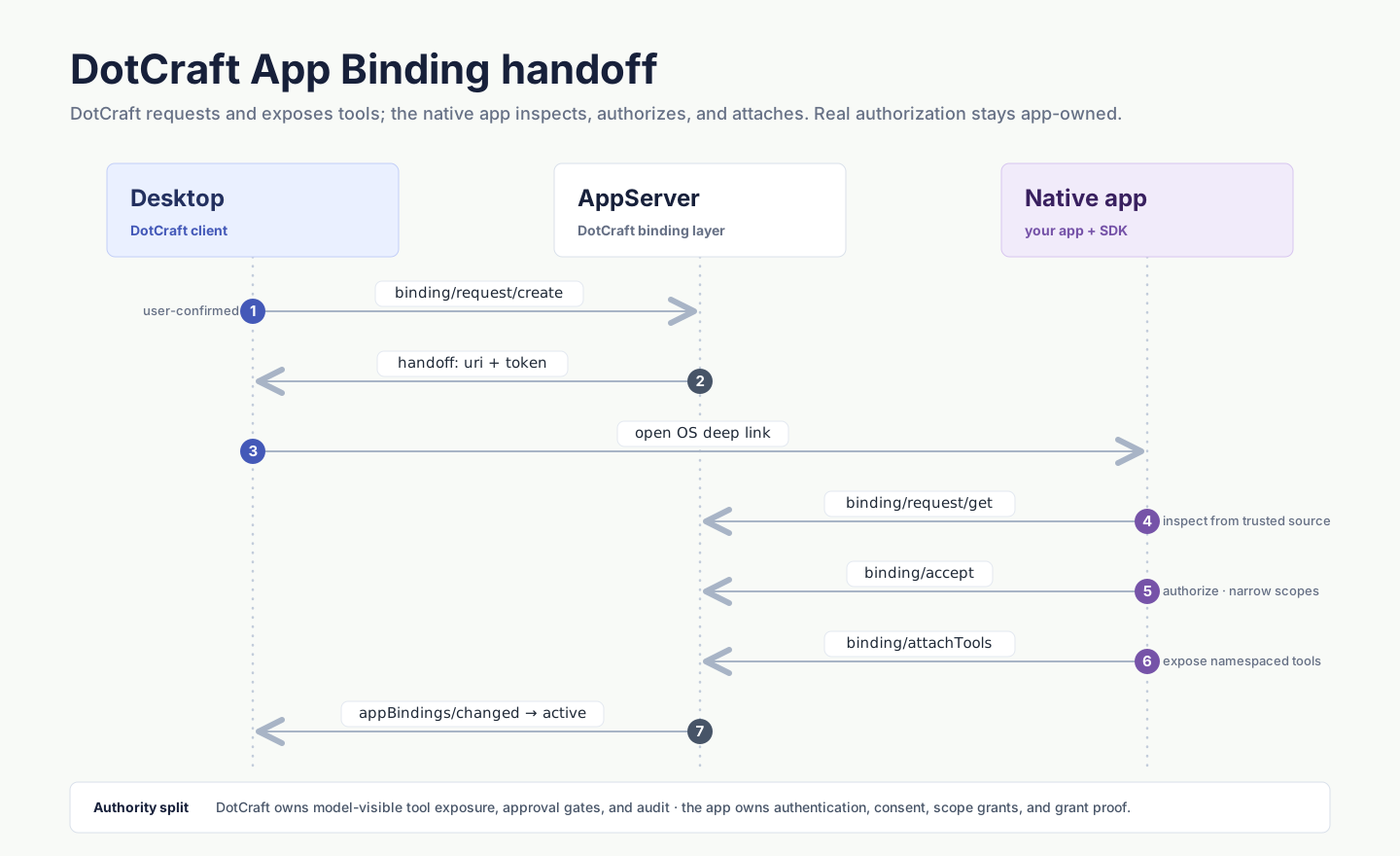
Connection (app/connection/*) works the same way at workspace+user+app scope and must complete before a binding request. DotCraft requires user confirmation before launching a handoff; the app inspects and authorizes before accepting.
Tool Exposure
- Dynamic-first transport. App-bound tools ride on Runtime Dynamic Tools but are bound to a persisted thread binding (not a transient connection), so the app can reattach after reconnecting. Clients render them as
dynamicToolCallitems. - Validation. For every attached tool DotCraft checks: plugin installed/enabled, binding usable for the thread, namespace equals
toolNamespace, tool name is in the catalog, granted scopes cover the tool's scope, and risk/exposure fit policy. - Direct vs deferred.
readmay be direct;mutateandexternalWritedefault to deferred. DotCraft may override placement for policy or prompt-cache stability. - Approval. App-bound tools reuse
DynamicToolSpec.approval. DotCraft gates before dispatch; the app still validates after. Prefer the propose → record → human approve → app writes pattern for external writes. - Offline stubs. When a binding is
offline, calls fail fast with a structured error. Standard codes:AppBindingOffline,AppBindingExpired,AppBindingRevoked,AppBindingScopeDenied,AppBindingToolUnavailable,AppBindingProtocolViolation.
App Context
Runtime thread/start.additionalContext and thread/resume.additionalContext are client-runtime hints. Use them with Runtime Dynamic Tools when the connected client needs to add short guidance, such as telling the agent to search for a deferred tool first.
App Binding context blocks use app/binding/context/*. They are persisted thread+app business context from an accepted binding, such as selected project metadata or app-side state that should survive reconnects. Both surfaces use App Context prompt semantics, but their lifecycle and write APIs are different.
Security Essentials
- Handoff tokens default to a 10-minute TTL, are single-purpose, bound to one request/app/workspace/user/operation (binding tokens also to thread + scopes), consumed on success, and never exposed to the model.
- The handoff endpoint is short-lived and only permits inspecting/completing the matching request and keeping the tool channel alive — not arbitrary thread execution or config mutation.
- Connection credentials are scoped to workspace + user + appId and permit only App Binding methods.
- Grant proof is app-owned. DotCraft stores only enough to ask the app to revalidate; treat
grantId/grantProofas references requiring app-side validation. - Deep links are activation hints, not authorization. Always inspect over AppServer before rendering confirmation or accepting.
Capability Check
Servers advertise capabilities.appBinding: true. Check it before calling any app/* or thread/appBindings/* method. App context blocks (app/binding/context/*) require capabilities.appContextBlocks; thread input dispatch (app/threadInput/enqueue) requires capabilities.appThreadInputEnqueue.
RPC Reference
| Area | Methods |
|---|---|
| Discovery | app/list, app/view |
| Connection | app/connection/{start,request/get,connect,status,revoke} |
| Binding | app/binding/{request/create,request/get,request/cancel,accept,attachTools} |
| Context & input | app/binding/context/{upsert,remove}, app/threadInput/enqueue |
| Thread management | thread/appBindings/{list,revoke,refresh}, thread/appContextBlocks/list |
| Notifications | app/list/updated, app/connection/changed, thread/appBindings/changed |
For typed parameters and results, use any DotCraft SDK or the AppServer Protocol. Persisted App Binding state lives at .craft/app-bindings/state.json.
See Also
- App Binding — the user-facing overview.
- SDKs — client libraries (.NET, TypeScript, Python), each with App Binding helpers.
- AppServer Protocol — the wire contract behind every SDK.
- Plugins & Tools — how plugins package apps.