
Skills & Self-Learning
Skills teach the agent how to do something once, so it doesn't have to work it out again next time. Each skill is a Markdown file with frontmatter that captures a procedure, and the agent loads it on demand when a matching situation comes up. Skills can be built in, written by hand, or saved by the agent itself after a job goes well — and if one breaks, you can always revert it to the original.
Skill Sources
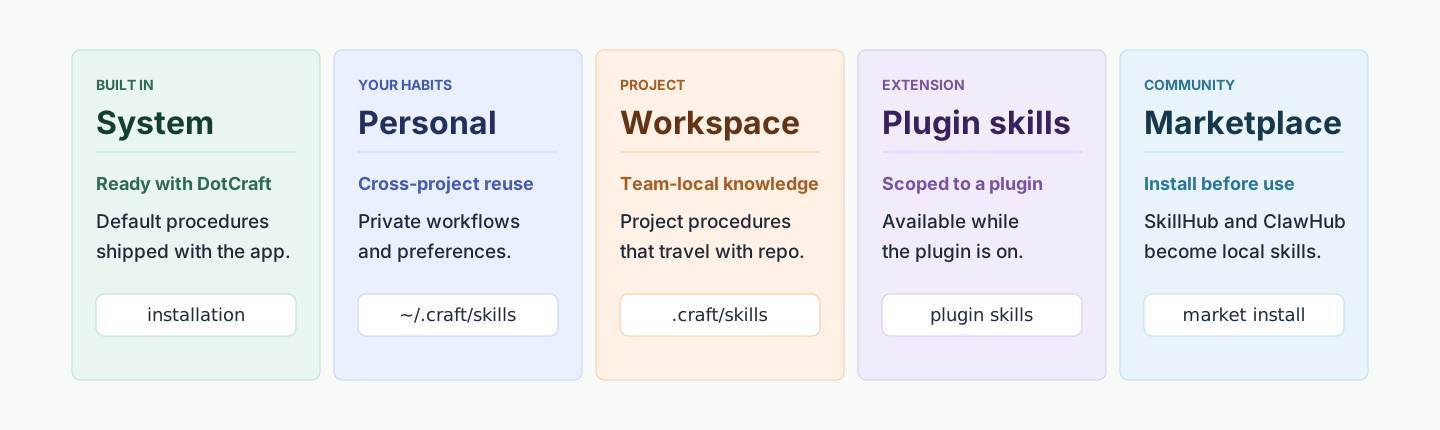
| Source | Path | Description |
|---|---|---|
| System | Inside the DotCraft installation | Built-in skills, shared by all workspaces |
| Personal | ~/.craft/skills/ | User-global skills, reused across workspaces |
| Workspace | .craft/skills/ | Project-specific skills, follow the repository |
| Plugin-bundled | .craft/plugins/<id>/skills/ | Skills shipped by a plugin, scoped to plugin lifecycle |
| Market-installed | .craft/skills/<id>/ (with .dotcraft-market.json) | Third-party skills from SkillHub / ClawHub |
Sources are not auto-enabled: enablement is controlled in the Skills management page. Market hits must be installed before they become local skills.
Agent Skill Self-Learning
When skill self-learning is enabled, DotCraft exposes a managed skill-editing capability so the agent can create, patch, and maintain workspace skills after successful work. Creation and destructive changes go through approval, and full limits are listed in the Configuration Reference.
Boundaries & Path Rules
- Self-learning writes only the current workspace's skill directory. System and personal skills are read-only — the agent must create a workspace copy to modify them.
- Supporting files may only live under
scripts/orassets/. - Absolute paths and
..traversal are rejected.
When to Save as a Skill
- Reusable procedure crystallized after a complex task
- A tricky bug that may resurface
- A user correction that became a stable step
- An existing skill found to be outdated or buggy
Trivial one-shot answers do not deserve a skill.
Search & Install in Desktop
The Desktop Skills page searches local skills and external marketplaces side by side:

The search box does two things at once:
- Filter currently installed local skills
- Query SkillHub and ClawHub when there is a search term
The source filter switches between All / System / Personal / Market. It only affects browsing, not enablement.
Install from the Marketplace
- Click a market hit in search results
- Read the README, description, and source links on the detail page
- Click Install with DotCraft
- DotCraft launches an install agent that inspects your workspace, system, and tools, and produces a local-environment optimized variant when differences are detected
- Refresh the local list when done

Installing a market skill via Desktop and generating a local variant
Market skills land at:
.craft/skills/<skill-name>/
.craft/skills/<skill-name>/.dotcraft-market.json
.dotcraft-market.json records source, version, and update state. If the workspace already has a same-named skill, Desktop confirms before overwriting.
Skill Variants: Keep Original, Layer Optimizations
When you install via Install with DotCraft, the agent keeps the original skill and produces an environment-tuned variant rather than overwriting. DotCraft prefers the active variant at runtime, but you can revert to the original from the Skills page any time.
That preserves the value of self-learning while keeping a clean rollback.
Enable / Disable Management
The Manage button on the Skills page is the bulk on/off entry:
- Click Manage
- Search installed skills
- Toggle each row's switch
The management page does not query SkillHub / ClawHub. Disabled skills do not enter the agent's context, but their files remain.
The Built-in skill-authoring Skill
When self-learning is on, DotCraft injects skill-authoring as an on-demand reference: it tells the agent the SKILL.md frontmatter rules, action selection, supporting-file path constraints, common pitfalls, and validation steps. Because skill-authoring declares tools: SkillManage, it disappears when self-learning is off.
Safety & Trust
- System and plugin-bundled skills are trusted by default.
- SkillHub and ClawHub are external; read README and source links before install, and validate in a branch or sandbox workspace if unsure.
- When the marketplace is unreachable, local skill search and management still work.
When to Use Which
| Scenario | Recommendation |
|---|---|
| Project-fixed flow ("run lint+test before any PR") | Workspace skill (hand-authored or agent-created) |
| Cross-project preference (your code style) | Personal skill |
| Distributable capability bundle (skills + tools) | Build a Plugin |
| Capture a freshly solved problem | Enable self-learning, let SkillManage create |
| Reuse a community solution | Skills page → market search → Install with DotCraft |
Related docs
- Plugins & Tools — distributing skills + tools as plugins
- Project Workspace — where
.craft/skills/sits - Samples —
dev-guide,feature-workflow, copy-and-adapt templates