
Memory & Dreams
DotCraft gives the agent a real memory of your project. As you work, it writes down what's worth keeping in plain Markdown files inside the workspace — so it remembers across sessions and entry points, and you can read, edit, or delete any of it whenever you want.
Three Layers of Memory
| Layer | Storage | Written by | Purpose |
|---|---|---|---|
| Session history | .craft/threads/ | Engine, automatically | Full Thread / Turn / Item timeline of each session |
| Long-term memory & history | .craft/memory/MEMORY.md, HISTORY.md | Agent maintains after successful turns | Project context, user preferences, recent decisions, recurring issues |
| Dreams | .craft/dreams/ | Background consolidation loop | Low-authority passive context (focus topics, open questions, low-signal noise to avoid) |
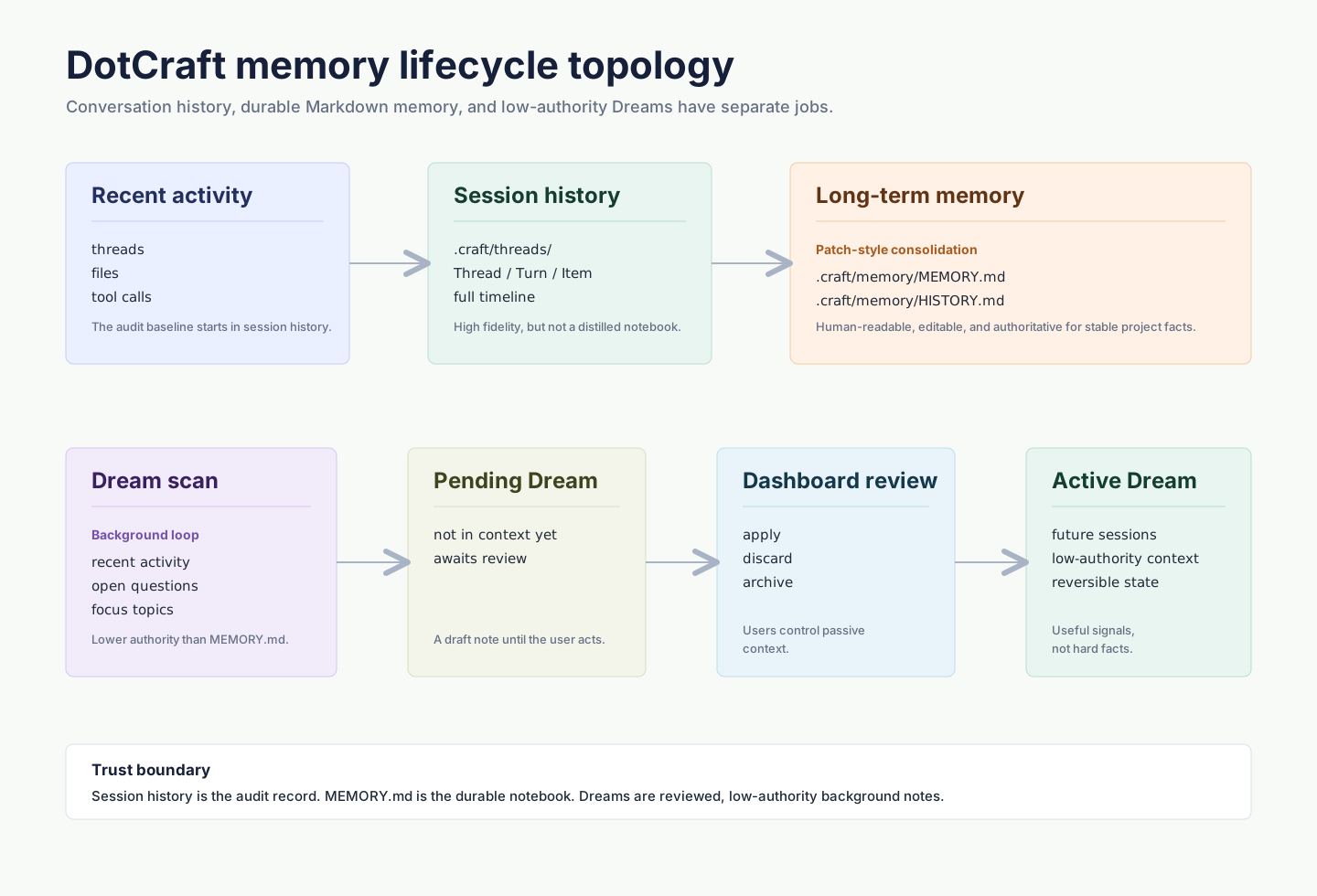
Session history is the audit baseline. Long-term memory is the agent-maintained, high-authority notebook. Dreams is the low-authority background scratchpad. The three roles do not overlap.
MEMORY.md / HISTORY.md — Agent Maintains, You Review
When long-term consolidation is enabled, every few successful conversation rounds DotCraft asks the agent to patch stable information back into .craft/memory/MEMORY.md and append the run to HISTORY.md. The exact schedule and consolidation model are configurable in the Configuration Reference.
Writes are patch-style: the agent does not blindly overwrite the entire MEMORY.md. It performs precise inserts or edits relative to your or its own existing notes. So manual edits to these files are safe — the agent reads your edited version next time.
TIP
Desktop's Settings → Personalization → Reset memory clears MEMORY.md, HISTORY.md, .craft/dreams/, and derived caches in one click. It does not delete sessions, config, skills, or automation tasks.
Dreams — Background Memory Consolidation
Dreams is DotCraft's background thinking loop. Whenever AppServer is running (even when you are not actively chatting), it periodically scans recent workspace activity and generates a low-authority passive memory store — think of it as a draft notebook that only enters future sessions after you review it.

| State | Meaning |
|---|---|
| pending | Auto-generated, not yet in context, awaiting review |
| active | Approved by user, joins future sessions as low-authority context |
| discarded / archived | Historical, no longer in context |
Desktop's Settings → Personalization → Dreams offers:
- Run now — Trigger a Dream consolidation immediately
- Auto-update Dreams — Off: new dreams stay pending. On: future successful runs auto-apply as active
- Manage Dreams — List of dreams, each opens Dashboard for diff / trace / apply / discard / cancel / archive
Dreams does not replace MEMORY.md; it complements it. Dreams is the right place for "recent focus" and "low-signal noise to avoid" — items too noisy to commit as authoritative memory but too important to lose with the session.
Related docs
- Project Workspace
- Skills & Self-Learning
- Observability
- Configuration Reference for
Memory.*andCompaction.*fields