
AppServer Protocol
AppServer Protocol 是 DotCraft 暴露给外部客户端的 JSON-RPC wire protocol。Desktop、TUI、ACP bridge、外部 channel adapter 和自定义 IDE client 都可以通过它创建或恢复线程、提交用户输入、消费流式事件,并参与命令执行或文件变更审批。
如果你只是在本机寻找或启动工作区 AppServer,请先使用 Hub Protocol。Hub 返回 AppServer WebSocket endpoint 后,后续会话流量才进入本协议。
适用场景
使用 AppServer Protocol 适合:
- 构建 Desktop、TUI、IDE、编辑器或浏览器前端。
- 构建非 C# client,例如 Node.js、Python、Rust 或 Swift 应用。
- 将 DotCraft 嵌入已有产品,复用会话、工具、审批和流式事件。
- 实现外部 channel adapter,让社交平台或机器人接入同一个工作区运行时。
如果你只是要在自动化脚本中运行一次性任务,优先考虑 CLI 或 SDK;AppServer Protocol 更适合长期连接和丰富 UI。
协议
AppServer Protocol 使用 JSON-RPC 2.0。每条消息都包含 "jsonrpc": "2.0"。
| 消息类型 | id | method | 方向 |
|---|---|---|---|
| Request | 有 | 有 | client → server 或 server → client |
| Response | 有 | 无 | 响应 request |
| Notification | 无 | 有 | client → server 或 server → client |
Request:
{
  "jsonrpc": "2.0",
  "id": 1,
  "method": "thread/list",
  "params": {}
}
Response:
{
  "jsonrpc": "2.0",
  "id": 1,
  "result": {
    "data": []
  }
}
Notification:
{
  "jsonrpc": "2.0",
  "method": "turn/started",
  "params": {
    "turn": {
      "id": "turn_001"
    }
  }
}
传输方式
| Transport | Wire format | 适用场景 |
|---|---|---|
stdio | UTF-8 JSONL;每行一条完整 JSON-RPC 消息 | 子进程 client,一对一连接,默认模式 |
websocket | 每个 WebSocket text frame 一条完整 JSON-RPC 消息 | 多客户端共享工作区、本地 Hub 托管、远程连接 |
stdio 模式下,stdout 保留给协议消息,日志和诊断输出应写入 stderr。
WebSocket 模式下,每个连接都有独立的初始化状态和线程订阅。通过 Hub 托管时,client 通常连接 endpoints.appServerWebSocket 返回的 URL。
初始化
每个连接的第一条 request 必须是 initialize。成功后,client 必须发送 initialized notification。
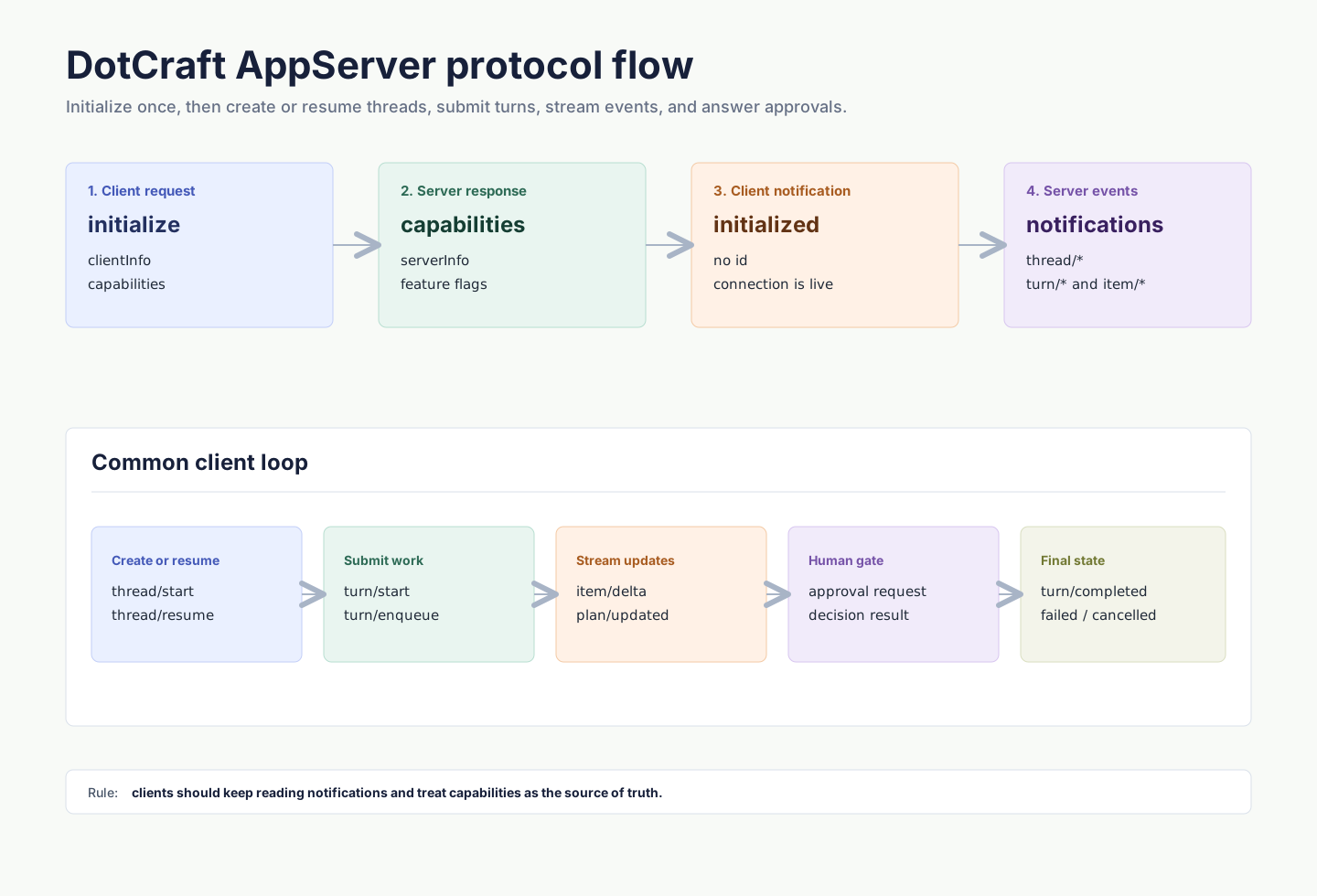
初始化 request:
{
  "jsonrpc": "2.0",
  "id": 0,
  "method": "initialize",
  "params": {
    "clientInfo": {
      "name": "my-client",
      "title": "My Client",
      "version": "0.1.0"
    },
    "capabilities": {
      "approvalSupport": true,
      "streamingSupport": true,
      "commandExecutionStreaming": true,
      "toolExecutionLifecycle": true,
      "configChange": true
    }
  }
}
初始化响应会返回服务端信息和能力:
{
  "jsonrpc": "2.0",
  "id": 0,
  "result": {
    "serverInfo": {
      "name": "dotcraft",
      "version": "0.2.0",
      "protocolVersion": "1",
      "extensions": ["acp"]
    },
    "capabilities": {
      "threadManagement": true,
      "threadSubscriptions": true,
      "approvalFlow": true,
      "skillsManagement": true,
      "pluginManagement": true,
      "skillVariants": true,
      "modelCatalogManagement": true,
      "mcpManagement": true
    }
  }
}
然后发送:
{
  "jsonrpc": "2.0",
  "method": "initialized",
  "params": {}
}
在初始化完成前发送其他方法会被拒绝。重复 initialize 也会被拒绝。
核心对象
| Primitive | 说明 |
|---|---|
| Thread | 一个可恢复的会话,包含工作区、来源 channel、配置和 turns。 |
| Turn | 一次用户输入及其触发的 agent 执行。 |
| Item | turn 内的输入或输出单元,例如用户消息、agent 消息、命令执行、文件变更、工具调用、计划和 reasoning。 |
常见流程:
thread/start创建新线程,或thread/resume恢复已有线程。turn/start提交用户输入。- 持续读取
turn/*和item/*notifications。 - 如果收到 server-initiated approval request,展示 UI 并返回 decision。
- 收到
turn/completed、turn/failed或turn/cancelled后更新 UI 状态。
线程
创建线程需要提供 identity,用于表示 client/channel、用户和工作区归属:
{
  "jsonrpc": "2.0",
  "id": 1,
  "method": "thread/start",
  "params": {
    "identity": {
      "channelName": "desktop",
      "userId": "local-user",
      "channelContext": "workspace:/Users/me/project",
      "workspacePath": "/Users/me/project"
    },
    "historyMode": "server",
    "displayName": "Fix tests"
  }
}
响应:
{
  "jsonrpc": "2.0",
  "id": 1,
  "result": {
    "thread": {
      "id": "thread_20260316_x7k2m4",
      "workspacePath": "/Users/me/project",
      "userId": "local-user",
      "originChannel": "desktop",
      "status": "active",
      "turns": []
    }
  }
}
Server 还会广播 thread/started。多 client 场景下,发起请求的 client 可能同时收到 response 和 broadcast,应按 thread id 去重。
常用 thread 方法:
| Method | 说明 |
|---|---|
thread/start | 创建新线程。 |
thread/resume | 恢复已有线程。 |
thread/list | 按 identity 列出线程。 |
thread/read | 读取线程、历史以及当前持久化 plan,不一定恢复执行上下文。 |
thread/subscribe | 订阅线程事件。 |
thread/unsubscribe | 取消订阅线程事件。 |
thread/rename | 更新显示名称。 |
thread/delete | 删除线程。 |
thread/config/update | 更新线程配置。 |
thread/mode/set | 切换 agent mode,例如 plan 或 agent。 |
回合
turn/start 提交用户输入并启动 agent 执行。响应会立即返回初始 turn,后续输出通过 notification 流式发送。
{
  "jsonrpc": "2.0",
  "id": 2,
  "method": "turn/start",
  "params": {
    "threadId": "thread_20260316_x7k2m4",
    "input": [
      {
        "type": "text",
        "text": "Run the tests and fix any failures."
      }
    ]
  }
}
响应:
{
  "jsonrpc": "2.0",
  "id": 2,
  "result": {
    "turn": {
      "id": "turn_001",
      "threadId": "thread_20260316_x7k2m4",
      "status": "running",
      "items": []
    }
  }
}
input 是 tagged union,常见类型包括:
text:普通用户文本。commandRef:结构化 slash command 引用。skillRef:结构化 skill 引用。fileRef:结构化文件引用。image:远程图片 URL。localImage:本地图片路径和可选 MIME 信息。
如果一个 turn 正在运行,Desktop 类客户端通常使用 turn/enqueue 将下一条输入加入队列,或使用 turn/interrupt 取消当前 turn。
事件
AppServer 通过 notification 推送线程、turn 和 item 状态。Client 应持续读取传输流,并把 item/completed 视为该 item 的最终状态。
常见 notification:
| Notification | 说明 |
|---|---|
thread/started | 线程创建。 |
thread/resumed | 线程恢复。 |
thread/deleted | 线程删除。 |
thread/renamed | 显示名称变化。 |
thread/runtimeChanged | 运行状态变化。 |
turn/started | turn 开始。 |
turn/completed | turn 成功完成。 |
turn/failed | turn 失败。 |
turn/cancelled | turn 被取消。 |
turn/diff/updated | 文件变更 diff 更新。 |
plan/updated | plan 更新,payload 包含来源 threadId 和完整 plan/todo 快照。 |
item/started | item 开始。 |
item/completed | item 完成,包含最终状态。 |
item/agentMessage/delta | agent 回复文本增量。 |
item/reasoning/delta | reasoning 增量。 |
item/commandExecution/outputDelta | 命令输出增量。 |
item/toolCall/argumentsDelta | 工具参数增量。 |
声明 capabilities.toolExecutionLifecycle: true 后,server 可额外发送 toolExecution item lifecycle:item/started 表示某个工具调用开始执行,item/completed 表示这个 callId 对应的工具已经完成。它是 UI/runtime enhancement,用于并行工具中提前更新单个工具状态;完整权威结果仍以匹配的 toolResult 为准。
Client 可以在 initialize.params.capabilities.optOutNotificationMethods 中传入精确 method 名称,关闭当前连接不需要的 notification。
审批
当命令执行、文件变更或其他敏感操作需要人工确认时,server 会发送 server-initiated JSON-RPC request。Client 必须展示审批 UI,并返回 decision。
命令审批示例:
{
  "jsonrpc": "2.0",
  "id": 50,
  "method": "item/approval/request",
  "params": {
    "threadId": "thread_20260316_x7k2m4",
    "turnId": "turn_001",
    "itemId": "item_005",
    "requestId": "approval_001",
    "approvalType": "shell",
    "operation": "dotnet test",
    "target": "/Users/me/project",
    "scopeKey": "shell:*",
    "reason": "Agent wants to execute a shell command."
  }
}
响应:
{
  "jsonrpc": "2.0",
  "id": 50,
  "result": {
    "decision": "accept"
  }
}
常见 decision 包括 accept、acceptForSession、acceptAlways、decline 和 cancel。可用 decision 以实际 request payload 为准。
如果 client 在 initialize 中声明 approvalSupport: false,server 会按自身策略处理无法交互的审批场景;富 UI client 应保持 approvalSupport: true。
API 概览
下面是 AppServer client 常用的方法族。
| 方法族 | 示例 | 说明 |
|---|---|---|
| 初始化 | initialize, initialized | 建立连接能力和 server 能力。 |
| Thread | thread/start, thread/list, thread/read, thread/subscribe | 会话生命周期和订阅。 |
| Turn | turn/start, turn/enqueue, turn/interrupt | 用户输入、队列和取消。 |
| Cron | cron/list, cron/remove, cron/enable | 定时任务管理。 |
| Heartbeat | heartbeat/trigger | 手动触发 heartbeat。 |
| Skills | skills/list, skills/read, skills/view, skills/restoreOriginal, skills/setEnabled, skills/uninstall | Skill 发现、有效内容查看、恢复原始技能、开关和可卸载 skill 删除。 |
| Plugins | plugin/list, plugin/view, plugin/install, plugin/remove, plugin/setEnabled | 插件发现、详情、安装、移除和启用状态管理。 |
| Commands | command/list, command/execute | 自定义命令发现和执行。 |
| Models | model/list | 模型目录。 |
| MCP | mcp/list, mcp/get, mcp/upsert, mcp/status/list, mcp/test | MCP 配置和状态。 |
| External channels | externalChannel/list, externalChannel/upsert | 外部 channel 配置。 |
| SubAgents | subagent/profiles/list, subagent/profiles/upsert | 子代理 profile 管理。 |
| Workspace config | workspace/config/update | 工作区配置更新。 |
Client 应根据 initialize 响应中的 capabilities 决定是否展示对应 UI。
skills/list 返回的 Skill 条目可能包含 hasVariant: true,表示当前运行环境下该技能会通过工作区适配内容执行。skills/read 仍读取源 SKILL.md;需要展示或执行有效内容时使用 skills/view。
Plugins 和 Skills 管理
Client 在调用 skills/* 前应检查 capabilities.skillsManagement,调用 plugin/* 前应检查 capabilities.pluginManagement。
skills/uninstall 只用于删除可卸载的工作区或个人 skill。系统 skill 不能卸载;plugin-contained skill 由插件生命周期管理,不能单独卸载。若卸载的 source skill 有关联变体,server 会同时清理该 source skill 的 workspace-local variants,并广播 workspace/configChanged,regions: ["skills"]。
插件生命周期把安装状态和启用状态分开:
plugin/install:把 Desktop 绑定分发的内置插件安装到当前工作区.craft/plugins/<id>/,写入.builtinmarker,并默认启用。未安装的内置插件只有在 AppServer 启动时设置了DOTCRAFT_BUILTIN_PLUGIN_ROOTS才会出现在 catalog 中。plugin/setEnabled:只切换已安装插件是否进入 Agent 上下文,不安装也不删除目录。plugin/remove:只移除带.builtinmarker 的 DotCraft 管理内置插件目录;不会删除用户维护的本地插件目录。
插件安装、移除或启用状态变化会广播 workspace/configChanged,regions: ["plugins", "skills"]。插件贡献的 tools 在会话中投影为 pluginFunctionCall item;它们不会再生成 companion toolCall / toolResult item。面向用户的插件模型见 插件与工具。
最小 Node Client 示例
下面示例使用 stdio 启动 AppServer、初始化连接、创建 thread 并启动 turn:
import { spawn } from "node:child_process";
import readline from "node:readline";

const workspacePath = process.cwd();
const proc = spawn("dotcraft", ["app-server"], {
  cwd: workspacePath,
  stdio: ["pipe", "pipe", "inherit"],
});

const rl = readline.createInterface({ input: proc.stdout });
let nextId = 0;
let threadId: string | undefined;

function send(method: string, params?: unknown, id = ++nextId) {
  proc.stdin.write(
    JSON.stringify({ jsonrpc: "2.0", id, method, params: params ?? {} }) + "\n",
  );
  return id;
}

function notify(method: string, params?: unknown) {
  proc.stdin.write(
    JSON.stringify({ jsonrpc: "2.0", method, params: params ?? {} }) + "\n",
  );
}

rl.on("line", (line) => {
  const message = JSON.parse(line);
  console.log("server:", message);

  if (message.id === 0 && message.result) {
    notify("initialized");
    send("thread/start", {
      identity: {
        channelName: "custom",
        userId: "local-user",
        channelContext: `workspace:${workspacePath}`,
        workspacePath,
      },
      historyMode: "server",
    });
    return;
  }

  if (message.result?.thread?.id && !threadId) {
    threadId = message.result.thread.id;
    send("turn/start", {
      threadId,
      input: [{ type: "text", text: "Summarize this repository." }],
    });
  }
});

send(
  "initialize",
  {
    clientInfo: {
      name: "custom-client",
      title: "Custom Client",
      version: "0.1.0",
    },
    capabilities: {
      approvalSupport: true,
      streamingSupport: true,
      commandExecutionStreaming: true,
      toolExecutionLifecycle: true,
      configChange: true,
    },
  },
  0,
);
生产 client 还应处理 process exit、JSON parse 错误、request timeout、approval requests、turn cancellation 和 reconnect。
错误与背压
JSON-RPC 错误响应使用标准 error 字段:
{
  "jsonrpc": "2.0",
  "id": 2,
  "error": {
    "code": -32602,
    "message": "Invalid params"
  }
}
常见错误处理建议:
Not initialized:确保第一条 request 是initialize。Already initialized:不要在同一连接重复初始化。Invalid params:检查 method 参数 shape 和 required 字段。Server overloaded; retry later.:对 WebSocket 请求做指数退避和 jitter。- Turn 失败:监听错误事件和最终的
turn/failed,不要只依赖 request response。
Client 实现检查清单
- 每个连接只初始化一次,并在 response 后发送
initialized。 - 为所有 request 分配唯一
id,并保留 id 类型。 - 持续读取 notification;不要只等待 request response。
- 按 thread id 和 turn id 做去重,尤其是多 client broadcast 场景。
- 把
item/completed作为 item 的最终状态。 - 支持 server-initiated approval request,或明确声明不支持。
- 使用
capabilities做功能发现,不要假设所有管理 API 都存在。 - 对未知 notification、item 类型和 capability 保持兼容。